Exploiting the Trust Gap: How Phantom Devices Bypass Microsoft Entra ID Conditional Access
In a recent high-fidelity red team engagement conducted by Howler Cell, security researchers uncovered a sophisticated attack vector capable of systematically neutralizing Microsoft Entra ID (formerly Azure AD) Conditional Access. This isn’t just a minor configuration error; it is a fundamental exploitation of the trust relationship between identity services and device registration protocols.
For most modern enterprises, Conditional Access serves as the digital perimeter. It evaluates granular signals—such as geographic location, device compliance posture, and real-time risk telemetry—to decide whether to permit or deny access. However, this operation proved that even the most robust policies can be rendered moot if the underlying mechanism used to establish “device trust” is flawed.
The breach began not with a complex exploit, but with a common commodity: a set of valid user credentials purchased from a dark web marketplace. Despite the target tenant housing over 16,000 users, the researchers successfully navigated from a single compromised identity to Global Administrator privileges without ever touching a corporate endpoint or deploying traditional malware.
The Achilles’ Heel: The Device Registration Service (DRS)
The crux of this bypass lies within the Device Registration Service (DRS). While Conditional Access is designed to block unauthorized access attempts, researchers from Cyderes discovered that the DRS endpoint often operates outside the strict enforcement of these policies.
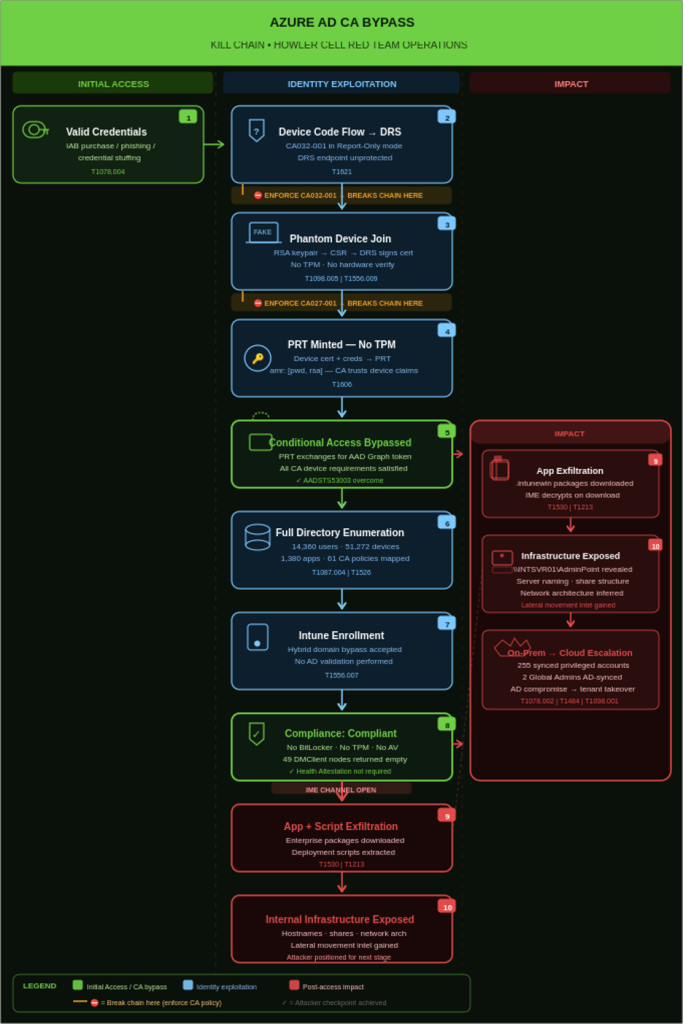
The DRS API is designed to validate tokens, but it lacks a rigorous mechanism to verify the physical legitimacy of the caller. This allows an adversary to perform a “phantom device registration.” By executing a single command, an attacker can register a non-existent, software-defined device, complete with a signed Azure AD certificate and a private key. This process bypasses the need for physical hardware, a Trusted Platform Module (TPM), or even administrative oversight.
This isn’t merely theoretical. This specific gap has been actively weaponized by Storm-2372, a Russian state-aligned threat actor, which has been leveraging this technique since August 2024 to infiltrate critical global infrastructure.
Weaponizing the Primary Refresh Token (PRT)
Once the “phantom device” is registered in the directory, the attacker can request a Primary Refresh Token (PRT). In a standard Windows environment, the PRT is the “holy grail” of authentication; it is a long-lived artifact that allows for seamless, silent access to cloud resources. While Microsoft typically binds the PRT to hardware-backed security, the researchers successfully extracted a PRT and stored it as a plaintext file on a standard Linux machine.
Because the PRT carries cryptographic claims asserting that the device is managed and trusted, the Entra ID ecosystem is effectively tricked. The network sees a valid, compliant device claim and grants access, completely bypassing MFA requirements tied to device posture.
To further cement this deception, the attackers had to navigate Microsoft Intune compliance checks. They exploited a logic flaw where Intune often exempts hybrid domain-joined devices from certain pre-registration requirements. By declaring the phantom device as a “hybrid member,” the attackers triggered an Intune compliance scan. When the fake device returned empty data for security features like BitLocker or Secure Boot, Intune’s logic defaulted to “not applicable” rather than “non-compliant.” The result? A Linux laptop was officially recognized as a fully compliant corporate asset.
Lateral Movement and the “Report-Only” Trap
With a “compliant” status achieved, the attackers accessed the Intune Management Extension. This allowed them to pull enterprise application packages. By decrypting these packages, they gained a blueprint of the target’s internal architecture, including server hostnames and administrative share structures—intelligence that usually takes weeks of manual reconnaissance to gather.
The most alarming discovery, however, was the risk inherent in Hybrid Identity environments. The researchers found that on-premises accounts synced to the cloud often held excessive privileges. By compromising a single synced account with administrative rights, an attacker could reset the passwords of Cloud Global Administrators, effectively seizing the entire tenant.
The catastrophic success of this operation was facilitated by a widespread configuration failure: the “Report-Only” trap. The organization had implemented policies to block unauthorized device code flows and enforce MFA for registration, but these policies were set to Report-Only mode. While the security logs correctly flagged the malicious activity, the system was configured to observe rather than intervene.
Defense-in-Depth: How to Secure Your Tenant
To mitigate the risk of phantom device registration and identity abuse, security teams must move beyond passive monitoring. We recommend the following immediate actions:
- Enforce, Don’t Just Report: Audit all Conditional Access policies. Move critical rules—specifically those targeting Device Code Flows (MITRE ATT&CK T1556.009) and Device Registration (T1098.005)—from “Report-Only” to “On.”
- Verify Hardware Integrity: Move away from relying on self-reported device compliance. Implement stricter validation mechanisms that require hardware-backed proofs (like TPM-based attestation) that cannot be easily spoofed in a software environment.
- Audit Hybrid Sync Privileges: Review the permissions of accounts synced from on-premises Active Directory. Ensure the principle of least privilege is applied to prevent a compromised on-prem account from becoming a gateway to cloud Global Admin rights.