PureRAT Hides PE Payload via Steganographic Delivery
Modern threat actors are increasingly moving away from traditional, disk-heavy malware in favor of “living-off-the-land” (LotL) techniques. A recent, highly sophisticated campaign involving PureRAT exemplifies this shift.
This campaign leverages a multi-stage execution chain that utilizes steganography to hide Portable Executable (PE) payloads within seemingly benign PNG images. By executing the vast majority of its logic directly in memory, this threat significantly raises the bar for traditional endpoint detection and response (EDR) and digital forensics investigations.
The attack is a masterclass in defense evasion, combining steganography, obfuscated PowerShell loaders, User Account Control (UAC) bypasses, and process hollowing to maintain a stealthy presence on compromised hosts.
The Initial Access Vector: Weaponized Shortcuts
The lifecycle of this infection begins with a weaponized Windows shortcut file (.LNK). Rather than directing the user to a legitimate document, the .LNK file is configured to trigger a hidden PowerShell instance. This script is designed to bypass the default PowerShell execution policy, effectively stripping away a primary layer of local security.
Once active, the PowerShell script reaches out to a remote Command-and-Control (C2) server to download an obfuscated VBScript loader, identified as tryinggim.vbs. Using the Start-Process command, the script executes this file from the system’s temporary directory, inheriting the security context and privileges of the current user.
In this operation, attackers use a layered infection chain that transforms a simple shortcut into a full-featured, remotely controlled PureRAT implant.
Stage 2: VBS Obfuscation and Persistent Execution
The second-stage VBS loader is a heavy-duty obfuscation engine. It is padded with significant amounts of junk data to confuse static analysis tools and manual reverse engineering. Upon execution, it moves itself to C:\Users\Public\Downloads under a randomized filename to avoid signature-based detection.
To maintain invisibility, the loader utilizes Windows Management Instrumentation (WMI), specifically the Win32_ProcessStartup class with the ShowWindow=0 parameter, to spawn subsequent payloads in a completely hidden state. To ensure the malware survives a system reboot, the script registers a Task Scheduler job that executes every sixty seconds, creating a highly resilient loop of re-infection.
Fileless PE Delivery via PNG Steganography
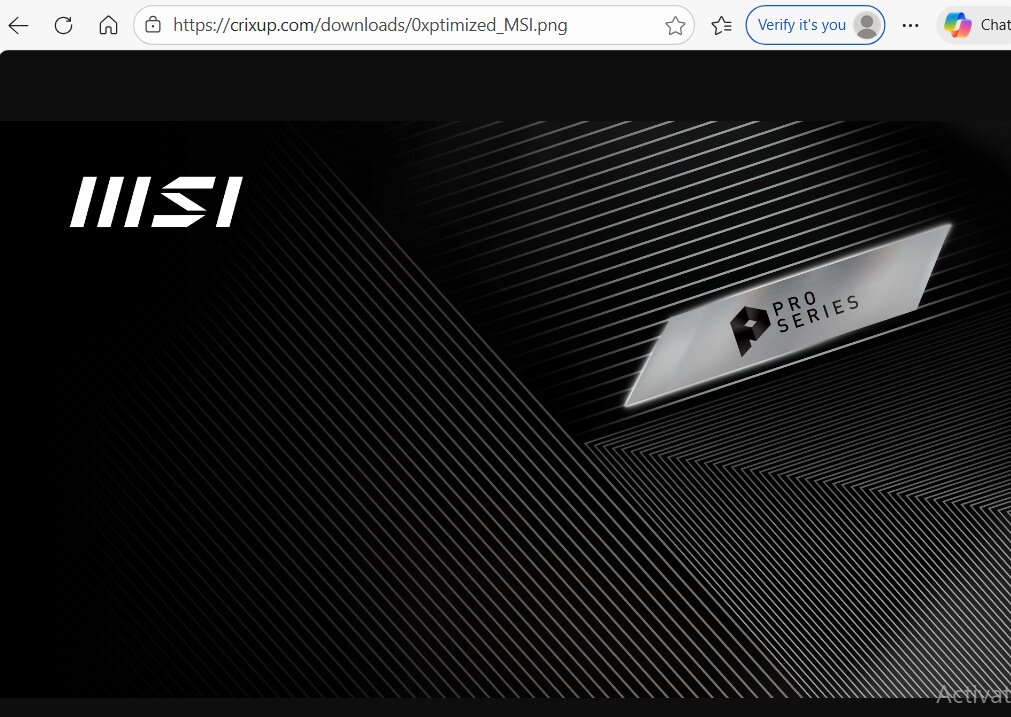
The most technically impressive aspect of this campaign is the transition to a fileless stage. Rather than dropping a malicious .exe to the disk, a PowerShell loader retrieves a counterfeit PNG image named 0xptimized_MSI.png.
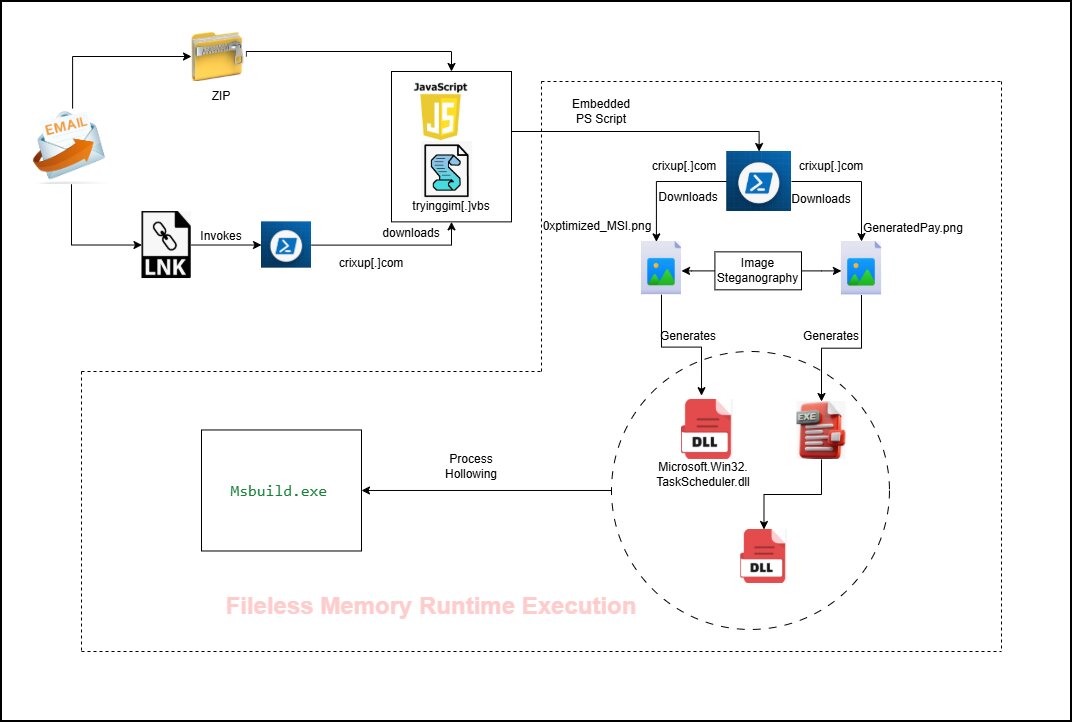
While the image appears benign to the naked eye, it contains a Base64-encoded PE payload hidden between custom markers within the image’s raw data. The PowerShell script performs a series of complex manipulations: it locates the data indices, extracts the blob, applies character substitutions, reverses the array order, and finally decodes the result into a byte array representing a .NET assembly.
The loader then pulls a second image, GeneratedPay.png, and uses the [System.Reflection.Assembly]::Load() method to inject the decoded assembly directly into the PowerShell process’s memory. This allows the malware to execute its logic without ever creating a suspicious file on the filesystem.
Privilege Escalation and UAC Bypass
To maximize its impact, the malware seeks higher privileges. The VBScript loader utilizes the conhost.exe process with the --headless flag to execute additional commands silently. For long-term persistence, it also modifies the registry via HKEY_CURRENT_USER\Software\Microsoft\Windows\CurrentVersion\Run.
A critical component of this campaign is the sophisticated UAC bypass. The malware exploits cmstp.exe (Microsoft Connection Manager Profile Installer) by generating a temporary INF file. This file contains a PreSetupCommands section that executes a PowerShell registry modification under auto-elevated privileges. To finalize the bypass, the malware uses Windows API calls to simulate keystrokes, effectively “clicking” through any remaining security prompts automatically.
Anti-Analysis and Process Hollowing
The PureRAT payload is highly “environment-aware.” Before deploying its full capabilities, it conducts several checks to detect if it is running in a virtualized sandbox or an analyst’s machine. This includes searching for VMware-specific artifacts and MAC addresses associated with QEMU environments.
The core DLL extracted from the PNG is protected by .NET Reactor, a tool intended to prevent reverse engineering. If the environment passes the checks, the malware proceeds to process hollowing.
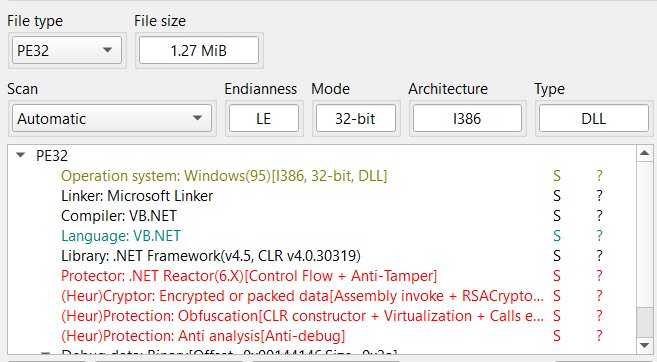
The malware identifies the system architecture, stages the payload in the appropriate directory (System32 or SysWOW64), and then launches a legitimate instance of Msbuild.exe in a suspended state. It unmaps the legitimate code from the process memory and replaces it with the malicious payload before resuming the thread. This allows the malicious activity to “hide” inside a trusted, digitally signed Microsoft process.
The Final Payload: Modular Post-Exploitation
The final stage is the PureRAT implant itself. Rather than being a static piece of malware, it acts as a flexible, modular framework. Upon initial infection, it performs intensive host fingerprinting, collecting data on security software, hardware IDs, OS versions, and user privilege levels.
The true danger lies in its modularity. Through remote C2 commands, operators can download specific plugins to enable various capabilities on the fly, including:
- Keylogging and credential theft
- Remote desktop access
- Webcam and microphone monitoring
- Dynamic payload delivery
Defensive Recommendations
This campaign serves as a stark reminder that file-based scanning is no longer sufficient. To defend against PureRAT and similar fileless threats, security teams should focus on:
- Behavioral Monitoring: Watch for suspicious PowerShell activity initiated by .LNK files or anomalous
cmstp.exebehavior. - Process Integrity: Monitor for suspicious memory modifications or “hollowing” within legitimate processes like
Msbuild.exe. - Task Scheduling: Audit for the frequent or unauthorized creation of Task Scheduler jobs.
- Network Inspection: Implement deep packet inspection to identify unusual traffic patterns, especially involving image files (PNG/JPG) being downloaded from unknown or non-reputable domains.