Technical Analysis: Sophisticated RVTools Impersonation via Valid Code-Signing Certificates
A sophisticated supply-chain style attack has been identified involving a malicious, trojanized installer for RVTools—a critical utility for VMware administrators. By leveraging a legitimately issued Sectigo code-signing certificate, the attackers have successfully bypassed Microsoft Defender SmartScreen and various endpoint detection and response (EDR) mechanisms. The end goal is the deployment of a multi-stage, Python-based Remote Access Trojan (RAT) designed for deep Active Directory (AD) reconnaissance and persistent Command and Control (C2) access.
In virtualization-heavy enterprise environments, the compromise of a systems administrator via this vector poses an existential threat, potentially handing complete domain-level control to the adversary.
The Anatomy of the Deception
The attack begins with a trojanized RVTools MSI installer. To establish an initial layer of trust, the binary is digitally signed with a Sectigo certificate issued to “Xiamen Lunwei Huage Network Co., Ltd.” Analysis suggests this is likely a shell entity established specifically to acquire a trusted publisher identity.
Because modern security products like SmartScreen rely heavily on digital signatures and publisher reputation, the signed installer executes without the standard “unrecognized app” warnings. To an administrator, the installer appears indistinguishable from the legitimate enterprise tool. Even though the certificate has since been revoked, any environment that does not strictly enforce real-time OCSP/CRL checks during execution remains vulnerable to these signed binaries.
The social engineering component is seamless. The installer mimics the standard user experience, complete with a legitimate-looking license agreement, requests for administrative privileges to “manage virtualization infrastructure,” and a final reboot prompt. These routine steps reinforce the illusion of legitimacy, encouraging users to bypass manual scrutiny.
Execution Flow and Obfuscation Techniques
The technical execution is highly stealthy. Upon installation, the MSI triggers a Custom Action that calls an embedded VBScript stored within the package’s internal Binary table (Binary.MyScript.vbs). This method ensures the malicious script never exists as a standalone file on the disk before runtime, effectively evading simple file-based scanners.
The VBScript payload utilizes heavy obfuscation through decimal-to-character encoding. Rather than containing plaintext commands, the script consists of long sequences of integers that are reconstructed via the Chr() function only at the moment of execution. This technique is specifically designed to frustrate static analysis tools looking for suspicious strings like Invoke-WebRequest or known cloud-storage URLs.
According to a report from K7 Security Labs, the choice of RVTools as a target is highly strategic, given its ubiquity among VMware professionals for vSphere inventory and visibility.
Once the obfuscated script is decoded, it spawns a hidden PowerShell instance to download a 30–33 MB archive named winp.zip from a Dropbox URL into the %AppData% directory. While the archive is being extracted, the installer presents a benign-looking reboot prompt, claiming it is “cleaning installation artifacts.” In reality, this is the final stage of the installation, preparing background agents to persist through the restart.
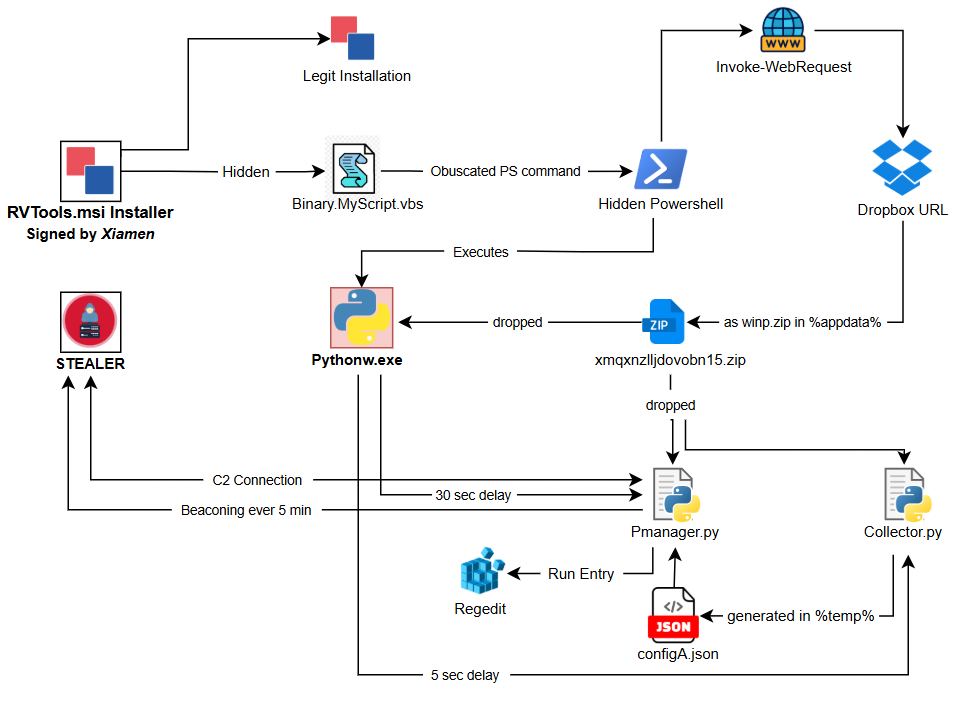
Execution Flow of RAT (Source: K7 Security Labs)
The Payload: A Portable Python Environment
The winp.zip archive contains a fully portable WinPython environment, including Python itself and common developer tools like VS Code, Spyder, and Jupyter Lab. This provides an ingenious layer of “living off the land” camouflage; to a system auditor, the presence of a developer stack on an admin workstation appears plausible rather than malicious. This environment hosts the two primary malicious components: collector.py and Pmanager.py.
Stage 1: Reconnaissance (collector.py)
After a five-second delay to evade immediate detection, collector.py executes. To remain invisible, it uses the Windows STARTF_USESHOWWINDOW flag with wShowWindow set to 0, ensuring all PowerShell and subprocess calls occur in the background without a window or taskbar icon.
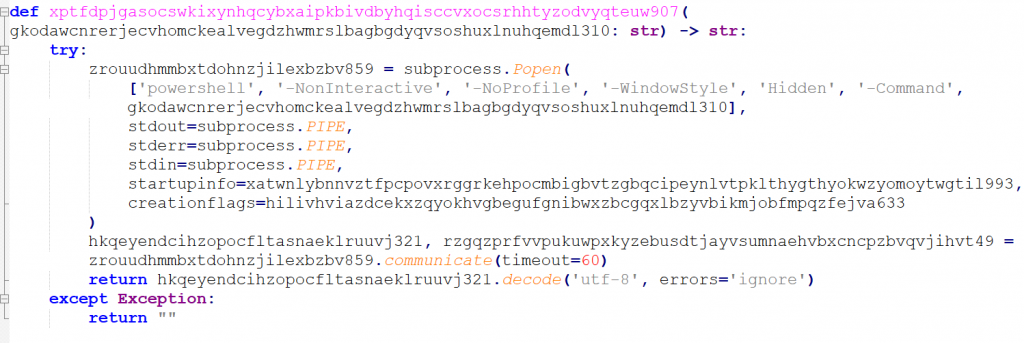
Obfuscated function for executing PowerShell silently (Source: K7 Security Labs)
This script performs extensive host fingerprinting. It enumerates running processes, services, network connections, and Active Directory details. To maintain a stable identity for the attacker, it generates a unique 8-character ID by hashing the host’s MAC address and hostname. To gauge the “value” of the target, it uses a PowerShell [adsisearcher] query to count all computer objects in the domain, helping the attacker prioritize high-value targets.
Data transformation is handled via an XOR-based wrapper (e.g., brrnhzl…772), which encrypts or decrypts the data buffers. All findings—including privilege levels (USER/ADMIN/SYSTEM), SIDs, and network topology—are staged locally in %TEMP%\configA.json.
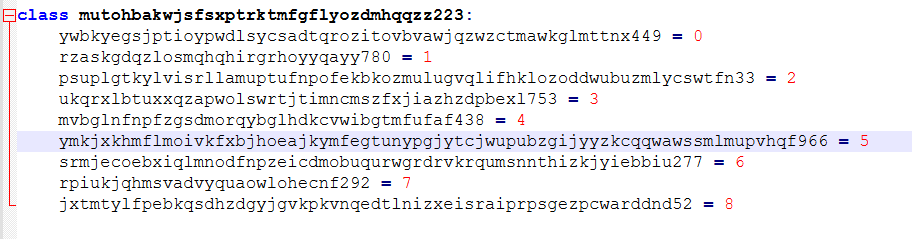
Central Command Enumerator (Source: K7 Security Labs)
Stage 2: Command, Control, and Persistence (Pmanager.py)
Approximately 30 seconds after reconnaissance begins, Pmanager.py takes control. It establishes persistence through redundant paths: a registry Run key in HKCU and a daily scheduled task with elevated privileges. This ensures the RAT survives reboots and basic remediation efforts.
The C2 engine utilizes a custom RC4-based encryption class. Before exfiltration, the configA.json data is wrapped with a random 16-byte salt, encrypted via RC4, and compressed using zlib. This makes the outbound traffic appear as high-entropy, random binary noise, making it extremely difficult for signature-based network security tools to detect. The engine communicates with a rotating pool of five hardcoded IP addresses, using a 300-second beacon interval that tightens to 10-second retries during connectivity failures.
Defensive Recommendations
This campaign serves as a critical reminder: a valid code-signing certificate is not a proxy for trust. Defenders must shift from identity-based trust to behavioral-based scrutiny.
- Monitor Process Behavior: Flag installers that spawn hidden PowerShell instances or unexpected background processes.
- Network Scrutiny: Alert on installers downloading large archives (30MB+) from public cloud storage like Dropbox.
- Endpoint Auditing: Monitor for the unexpected installation of developer environments (WinPython, VS Code, Jupyter) on infrastructure management workstations.
- Verify Sources: Ensure all virtualization tools are sourced exclusively from official vendor distribution points (e.g., Dell/Robware).
Indicators of Compromise (IoCs)
| File Name | Hash (SHA-256/MD5) | Detection Name |
|---|---|---|
| d0f5e98fb840fb5656d3f50613b6f1ec60e57392643159841bc1fa95396087a4.msi | 64bda120cb447e0c03f451190022a57b | Trojan (0001140e1) |
| Binary.MyScript.vbs | 01A115C6F6BA3837234202A1E0D28BDC | Trojan (0001140e1) |
| Pmanager.py | 71085940124AD3C035A181ACADC10362 | Trojan (0001140e1) |
| collector.py | 9192D18A955A9D03E2C70B60AAC1784A | Trojan (0001140e1) |