Analyzing the Multi-Stage PowerShell Intrusion via Weaponized JPEG and Trojanized ScreenConnect
Cyber adversaries are currently deploying a highly sophisticated, multi-stage attack vector that weaponizes seemingly innocuous JPEG files to deploy a trojanized version of the ConnectWise ScreenConnect remote-access tool. This campaign is designed for stealthy, long-term persistence, enabling full-scale surveillance, credential harvesting, and deep network infiltration on Windows-based enterprise environments.
The complexity of this operation lies in its ability to blend into the noise of legitimate enterprise software, using “living-off-the-land” techniques to bypass traditional perimeter and endpoint defenses.
The Initial Vector: Deceptive Payload Delivery
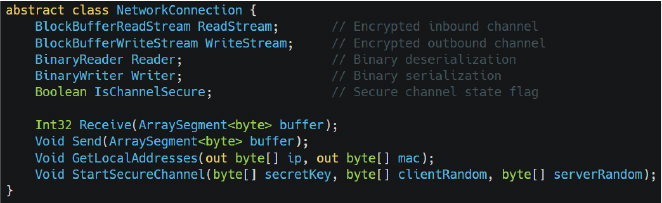
The intrusion begins with a file masquerading as “sysupdate.jpeg.” While the file extension suggests a standard image, the file does not contain valid JPEG headers or pixel data. Instead, it houses an obfuscated PowerShell script. This tactic exploits the inherent trust users place in image files, allowing the payload to bypass basic extension-based filtering in email gateways and cloud storage platforms.
Upon execution, the embedded PowerShell logic initiates a multi-stage sequence:
- Staging: The script establishes directory structures on the local system drive to house subsequent payloads.
- C2 Connection: It reaches out to the attacker-controlled domain
legitserver.theworkpc.comvia non-standard port5443to fetch additional modules. - Defense Evasion: To evade detection, the script utilizes heavy string obfuscation and sophisticated AMSI (Antimalware Scan Interface) bypass techniques, ensuring the malicious logic remains resident in memory rather than touching the disk as a static file.
CYFIRMA identified this highly sophisticated campaign, noting that the threat actors employ a “compile-after-delivery” methodology. Rather than dropping a pre-compiled binary, the PowerShell loader invokes the legitimate Microsoft .NET compiler (csc.exe) to compile a custom launcher, uds.exe, directly on the victim’s machine. This approach results in a unique file hash for every single infection, effectively neutralizing signature-based detection and traditional hash-blocking strategies.
Privilege Escalation and Persistence
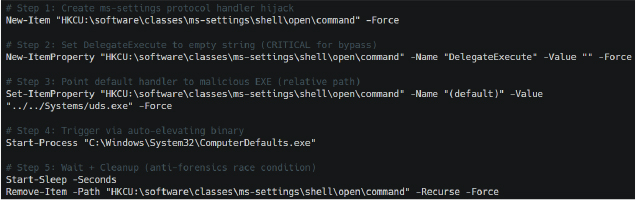
Once uds.exe is compiled, it seeks to gain SYSTEM-level authority. The malware executes a fileless User Account Control (UAC) bypass. It achieves this by abusing the auto-elevating Windows binary ComputerDefaults.exe in conjunction with a malicious hijack of the ms-settings registry key. By configuring a specific protocol handler and leaving the DelegateExecute value empty, the malware triggers an elevated process without alerting the user with a standard UAC prompt. To maintain a low forensic footprint, the malware immediately scrubs the modified registry keys.
With elevated privileges secured, the attacker establishes persistence by installing a Windows service disguised as “OneDriveServers”. This service serves as the backbone for the primary payload: a modified version of the ScreenConnect client (v25.9.5.9483).
This trojanized client is a masterpiece of deception. It utilizes legitimate, digitally signed ConnectWise binaries to establish a veneer of authenticity, but it loads a tampered, unsigned ScreenConnect.Core.dll. This allows the attacker to hijack the remote-support framework. The C2 communication is further hardened via a hard-coded HostToAddressMap pointing to the IP 45.138.16.64 on port 8041, ensuring connectivity even if DNS-based monitoring is active.
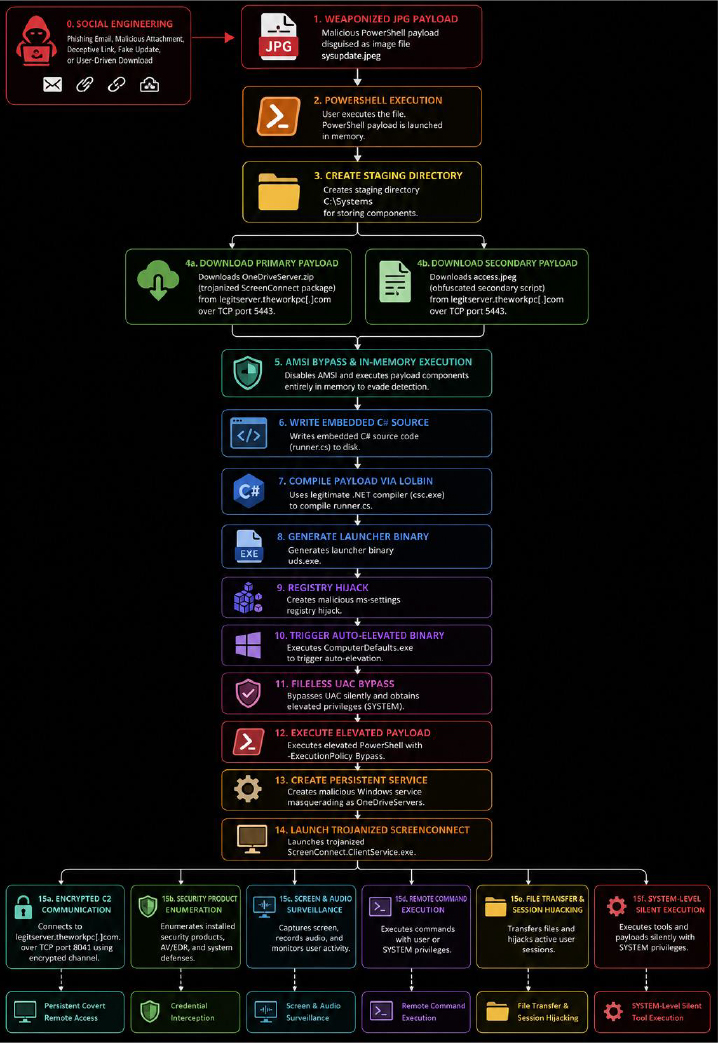
To protect their activities from network-based inspection, the malware implements a custom PBKDF2-HMAC-SHA256 key-derivation routine. This generates unique, session-specific encryption keys for all inbound and outbound traffic, masking screenshots, keystrokes, and command data.
Operational Capabilities: Beyond Remote Support
The scope of this tool is significantly more aggressive than a standard RMM (Remote Monitoring and Management) suite. Decompiled analysis reveals at least 46 distinct operator capabilities designed for deep espionage:
Attackers can perform:
- Live screen viewing and continuous background recording.
- Microphone/speaker capture and clipboard monitoring.
- Intercepting print jobs and silent file transfers.
- Executing commands with SYSTEM-level privileges via hidden desktop sessions.
- Credential Provider Interception: The malware hooks the Windows logon process to capture credentials directly from the UI before they are processed by
LSASS. - Account Lifecycle Management: Attackers can silently create hidden administrator accounts or modify existing group memberships without visibility in the standard Windows user interface.
Defensive Recommendations
This campaign highlights a growing trend of threat actors abusing legitimate RMM tools to establish covert backdoors. To defend against this, security teams should adopt the following posture:
- Restrict PowerShell: Implement Constrained Language Mode and monitor for unusual PowerShell execution from non-admin users or untrusted directories.
- Hardening: Strengthen UAC policies and monitor registry modifications to sensitive keys like
ms-settings. - RMM Monitoring: Closely audit all ScreenConnect installations. Alert on any service creation that mimics legitimate services (e.g., “OneDriveServers”) and monitor for connections to the
theworkpc.comdomain. - File Inspection: Enhance email and web gateway inspection to look for non-standard content within image files (e.g., embedded scripts in JPEGs).
INDICATORS OF COMPROMISE (IOCs)
| No | Indicators of Compromise (IOCs) | Type | Remarks |
|---|---|---|---|
| 1 | 45[.]138[.]16[.]64 | IP Address | Block |
| 2 | legitserver[.]theworkpc[.]com | Sub-Domain | Block |
| 3 | 7adffc1c0b3fdcba46e8d0a81203c955976d4ef39893c98d0b2dbfbb8d6a8ec3 | SHA256 | Block |
| 4 | ecd5ed16975d556d1d17bc980f248f8a5262bed11df9d9cf999efd9c273c11df | SHA256 | Block |
| 5 | cea1d85967d2c456fccecae3a70ff2adfe4c113aacf9d18c35906c2ed24ca9b4 | SHA256 | Block |
| 6 | e4c9f3bb4a65c640795bfc1a56c0b56485b849ccd97027eed7ad9aa78a732a4f | SHA256 | Block |
| 7 | ee3d776cdaf82335e4293e19ee313cc35eee49cde9963b96766a8f9c89d44a79 | SHA256 | Block |
| 8 | 4d8ac85c5b98c69ba44146df61183e9bf613edd796aa516c3ae73611b7d77c06 | SHA256 | Block |
Note: IP addresses and domains are intentionally defanged (e.g., [.]) to prevent accidental resolution. Re-fang only within controlled threat intelligence platforms such as MISP, VirusTotal, or your SIEM.